Need support? Submit your request directly online
The recent Microsoft email outage highlighted how email disruptions can affect communication, including requests for support.
To help ensure your request reaches our support system, please log tickets through at utilmate.zendesk.com.
Why submit your request online?
- Avoid email delivery issues: Submit your request directly into our support system without relying on your email service to send it.
- Help us investigate sooner: Include a clear description, screenshots, error messages and relevant account numbers to help us investigate.
- Keep everything together: Your request, attachments and subsequent updates stay linked to one ticket.
- Track your requests: Sign in to the Knowledge Base to view your tickets, check their status and follow progress.
- Add updates easily: Check an existing ticket and provide further information without creating duplicates - helping our team keep the full picture in one place.
- Maintain a support history: Refer back to previous requests and solutions.
- Prioritising by business impact: Tickets are prioritised according to their impact on your business, helping our team escalate issues that disrupt critical operations.
How to log a ticket
From your browser: Visit utilmate.zendesk.com and select Submit a Request.
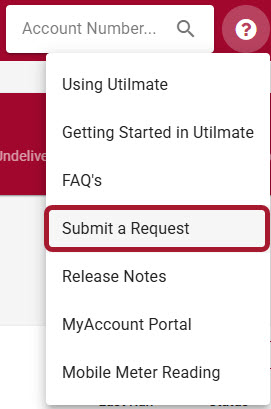
From Utilmate CRM: Click the ? icon, then select Submit a Request.
If email is disrupted, you may not receive confirmation or notification emails promptly. Sign in to the Knowledge Base to check your request and view updates directly.
Thank you for helping us keep your support requests organised and moving forward.